Bookings that arrive with the deposit already paid.
Calendrax is a WordPress booking plugin for businesses that sell time. Customers choose a service and a time, pay a deposit through your own Stripe account, and manage the booking themselves. A no-show no longer costs you the slot.
Free on WordPress.org. Pro is $49 once, not a subscription. Calendrax takes no cut of your bookings.
- Balayage and tonerMaya R. with Joan$40 deposit paid
- OpenBookable online now2 times left
- Beard trimTheo K. with SamPaid in full
- Colour consultationPriya D. is paying nowHeld for 30 min
- Cut and finishAna L. with Joan$20 deposit paid
Collected before anyone walked in$135.00
How a deposit booking works
The customer picks a time
Service, date and time on one screen, then their details. The time is held while they pay, so nobody else can take it.
They pay the deposit on your site
Stripe’s secure payment form opens right inside the booking page: cards, Apple Pay and Google Pay. The money goes straight to your own Stripe account.
Stripe confirms, then the booking does
Calendrax confirms only after Stripe’s signed message arrives. A customer closing the tab, or faking a “paid” link, confirms nothing.
They manage it themselves
Every email carries a private link to view or cancel within your rules, and your number to change the time. Refunds go back through Stripe from your admin.
Everything a booking page needs, free
The free plugin on WordPress.org is the full booking system, not a trial. It runs on your site, stores bookings in your own database, and appears only where you paste a shortcode.
- Unlimited services, staff and bookings. No caps in the free plugin.
- Deposits as a fixed amount or a percentage, full payment, or pay at the appointment.
- Staff hours, breaks, days off, buffers, minimum notice and group classes.
- Booking form that takes your theme’s font, with light or dark mode and your colours.
- Confirmation and reminder emails with a header in your brand colour.
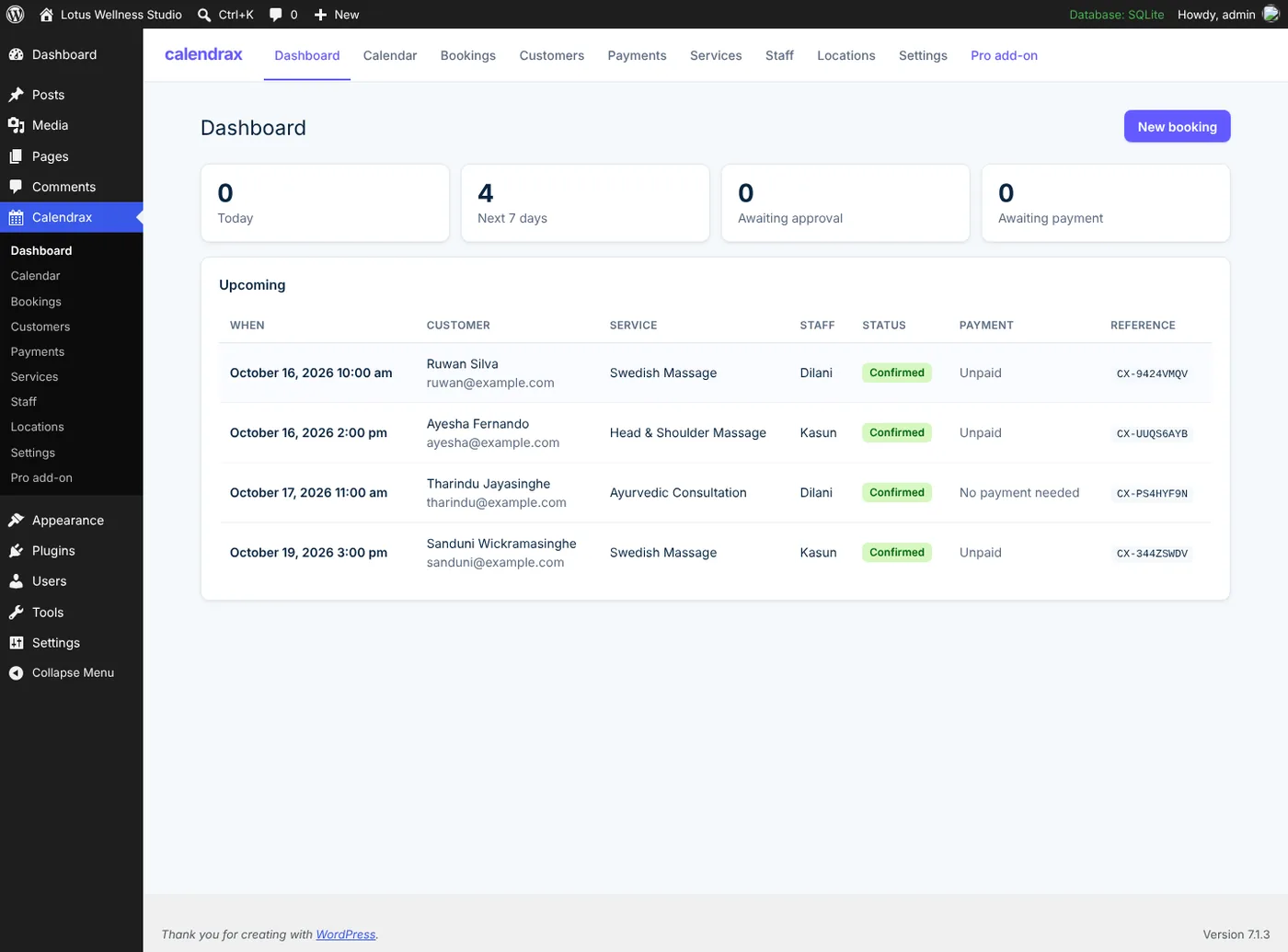
- One admin page for calendar, bookings, customers and payments. No page reloads.

See it working
Real screens from the plugin, captured by our automated tests.



Pro, for when the business grows
One payment of $49 for one website, with 12 months of updates and email support. It keeps working after that.
14-day money-back guarantee

AI assistant on every page
A floating chat that answers “what offers do you have?” from your own pages and books real free times.
AI voice agent
Answers your phone and a “Talk to us” button on your site, day and night: questions, new bookings, reschedules and cancellations.
More locations
Each with its own timezone, hours, staff and prices, plus a manager role per location.
Reports and exports
Revenue, no-shows and cancellations by service, staff and location. CSV for your accountant.
Connections
Stripe promotion codes, calendar feeds for your phone, and signed webhooks for Zapier, Make or n8n.
Priority support
Your questions go to the front of the queue, answered within one working day, including help connecting Stripe and your voice agent.
New in Pro
Meet your AI receptionist
It answers your phone and the “Talk to us” button on your website, any hour. It knows your services and prices, finds real free times, and books, moves or cancels appointments, then emails the confirmation.
- Set up from one screen in WordPress with your Vapi account
- Callers only change their own bookings
- Deposits by email link, never card numbers by phone
- Every call logged with a short summary

Made for anyone who sells appointments
If an empty chair, room or calendar slot costs you money, a deposit fixes it. These are the amounts businesses usually ask for.
| Business | Typical deposit |
|---|---|
| Hair and beauty salons | $20–$50 or 25% |
| Spas and massage | 30–50% |
| Clinics and therapists | Fixed fee per session |
| Photographers | 25–50% to hold the date |
| Tutors and coaches | Full payment upfront |
| Repair and home services | Call-out fee |
Your data stays on your website
- Bookings and customers
- Stored in your WordPress database. Deactivating or deleting Calendrax never removes them unless you choose to.
- Card details
- Typed into Stripe’s secure form. They never touch your site’s database or ours.
- What Exceat Lab receives
- For Pro: your license key, site address and plugin version. Nothing about your customers.
- AI chat and calls
- Chat goes to Google with your own Gemini key; calls run on your own Vapi account. Both keys are stored encrypted and never shown to visitors.
Questions people ask first
Do I need a Stripe account?
Only to take money online. Free bookings and pay-at-the-appointment work without Stripe. When you are ready, connect your own Stripe account in about two minutes: paste your Stripe keys, or sign in with Stripe.
Does Calendrax take a fee from each booking?
No. Stripe charges its normal processing fee. Exceat Lab takes nothing per booking, on Free or Pro.
Will it work with my theme or page builder?
Yes. It is shortcode-only, so it works in the block editor, Elementor, Divi, Beaver Builder and classic themes, and uses your theme’s font by default.
What happens if I stop paying for Pro updates?
Nothing breaks. Pro keeps working; you just stop getting new versions until you renew.
Take your first deposit this afternoon
Install the free plugin, run the two-minute quick setup, connect Stripe, paste one shortcode.